 HUB MOON
Install · Linux
Linux, whichever one you run.
Every release builds an AppImage, a .deb, an .rpm and a
portable tarball, and the repository carries an Arch PKGBUILD and a Nix
flake. Find your family below — then read §03, which is the one
step that is not obvious.
- AppImage
- any glibc distro
- .deb
- Debian family
- .rpm
- RPM family
- PKGBUILD
- Arch family
- flake.nix
- Nix · NixOS
- tar.gz
- portable
- libc
- glibc ≥ 2.35
- Access
- hidraw + usb · udev
Pick your distribution
Download the matching file from the release page first — every command below assumes it is in your current directory.
Arch
PKGBUILDArch · CachyOS · EndeavourOS · Manjaro · Artix
$ git clone \
    https://github.com/MiyukiVigil/Hub_Moon.git
$ cd Hub_Moon/packaging
$ makepkg -si
Installs the udev rule, a desktop entry and both
entry points. PKGBUILD.local builds from your working copy without a tag.
Debian
.debDebian · Ubuntu · Mint · Pop!_OS · Zorin · elementary
$ sudo apt install \
    ./hub-moon_2.0.0-1_amd64.deb
# remove with
$ sudo apt remove hub-moon
The leading ./ matters — without it
apt looks for a package by that name in your repositories.
Fedora
.rpmFedora · RHEL · Rocky · Alma · CentOS Stream
$ sudo dnf install \
    ./hub-moon-2.0.0-1.x86_64.rpm
# remove with
$ sudo dnf remove hub-moon
The package is unsigned, so dnf will ask you to
confirm the import prompt — or pass --nogpgcheck.
openSUSE
.rpmTumbleweed · Leap · MicroOS (layered)
$ sudo zypper --no-gpg-checks install \
    ./hub-moon-2.0.0-1.x86_64.rpm
Same RPM as the Fedora family; zypper wants the unsigned flag spelled out.
NixOS
flakeNixOS · Nix on any distribution
$ nix build github:MiyukiVigil/Hub_Moon
$ ./result/bin/hub-moon-gui

# or import the module for the app AND the udev rule
imports = [
  hub-moon.nixosModules.default
];
The flake is written but has not been built here — no Nix on this machine. Reports welcome.
Immutable
layeredSilverblue · Kinoite · Bazzite · Bluefin
$ rpm-ostree install \
    ./hub-moon-2.0.0-1.x86_64.rpm
$ systemctl reboot

# or skip layering entirely and use the AppImage
The AppImage needs no layering and no reboot, which on an image-based system is usually the better trade.
Steam Deck
AppImageSteamOS · desktop mode
$ chmod +x HubMoon-2.0.0-x86_64.AppImage
$ ./HubMoon-2.0.0-x86_64.AppImage
The root filesystem is read-only, so install the
udev rule after sudo steamos-readonly disable — or just run the CLI with
sudo when you need to write.
Anything else
portableVoid · Gentoo · Slackware · Solus · Garuda · you name it
$ chmod +x HubMoon-2.0.0-x86_64.AppImage
$ ./HubMoon-2.0.0-x86_64.AppImage

# or the plain tarball, unpacked anywhere
$ tar xzf \
    HubMoon-2.0.0-linux-x86_64.tar.gz
$ ./hub-moon/hub-moon --list
Neither installs the udev rule — do §03 yourself.
Alpine & musl
sourceAlpine · Chimera · any musl system
$ sudo apk add python3 py3-pip \
    hidapi eudev
$ pip install --user \
    "hub-moon @ git+https://github.com/MiyukiVigil/Hub_Moon"
The prebuilt bundles are glibc — the AppImage, the tarball, the deb and the rpm will not run here. Install from source instead.
Or from source, anywhere
Distribution-independent, and the version to use if you want the module importable.
Every current distribution now refuses a global pip install, so use
pipx or a virtualenv.
$ pipx install "hub-moon[gui] @ git+https://github.com/MiyukiVigil/Hub_Moon"
$ hub-moon --list

# CLI only — hidapi and certifi, nothing else
$ pipx install "hub-moon @ git+https://github.com/MiyukiVigil/Hub_Moon"
sudo pacman -S python-pipx hidapisudo apt install pipx libhidapi-hidraw0 libhidapi-devsudo dnf install pipx hidapi-develsudo zypper install python3-pipx libhidapi-hidraw0sudo xbps-install -S python3-pipx hidapi-develThe udev rule
This is the step people miss. Raw HID nodes are root-owned by default on most
distributions, so without a rule the tool reports that it failed to open the device —
even though lsusb can see it perfectly well.
The .deb, .rpm, Arch and Nix packages install the rule for
you and reload udev afterwards. It is the AppImage, the tarball and a
pip install that leave it to you. Some distributions — CachyOS and Arch
among them — are already permissive enough for a DAWN PRO2 without any rule at all.
Write the rule
It matches the vendor ID, not a product ID, so it covers every Moondrop DAC on the bus — including one this tool has never seen.
Two lines, because hidapi has two Linux backends. A distro's own
python-hidapi is hidraw-backed and opens /dev/hidrawN.
Every binary release here — tarball, AppImage, .deb, .rpm,
Arch — bundles the manylinux wheel, which is libusb-backed and opens
/dev/bus/usb/BBB/DDD instead, needing write access to it. One line
without the other looks like a DAC that is not there.
$ echo 'SUBSYSTEM=="hidraw", ATTRS{idVendor}=="35d8", TAG+="uaccess", MODE="0660"'
    | sudo tee /etc/udev/rules.d/70-moondrop.rules
$ echo 'SUBSYSTEM=="usb", ATTRS{idVendor}=="35d8", TAG+="uaccess", MODE="0660"'
    | sudo tee -a /etc/udev/rules.d/70-moondrop.rules
Reload, and replug the DAC
Rules apply when a device appears, so the currently attached one keeps its old permissions until it is re-enumerated.
$ sudo udevadm control --reload-rules && sudo udevadm trigger
Check it took
Both nodes should carry the + that marks a uaccess ACL. The USB one is
the one a binary release actually uses; check it with the bus and device numbers
lsusb just printed.
$ lsusb | grep 35d8
Bus 003 Device 006: ID 35d8:011d MOONDROP DAWN PRO2
$ ls -l /dev/hidraw*
crw-rw----+ 1 root root 240, 2 … /dev/hidraw2
$ ls -l /dev/bus/usb/003/006
crw-rw----+ 1 root root 189, 261 … /dev/bus/usb/003/006
$ hub-moon --list
TAG+="uaccess" hands the device to whoever owns the active login
session, which is why it is the default here — nothing becomes writable by every
user on the machine. On a system whose logind does not apply it, replace it with
GROUP="plugdev" and add yourself to that group, or fall back to
MODE="0666" if you would rather not explain group membership to
anyone.
Running it
.deb, .rpm and Arch packages install a .desktop entry and an icon. That is the way to use it.hub-moon --list · --info · --get-peq · see the manual. Same program, same engine../hub-moon/hub-moon — with no arguments it opens the window.python3 moondrop_control.py --gui. A checkout has no launcher entry and no packaged wrapper, so this is the one place the flag is still how you get in.zenity; without it they report a cancel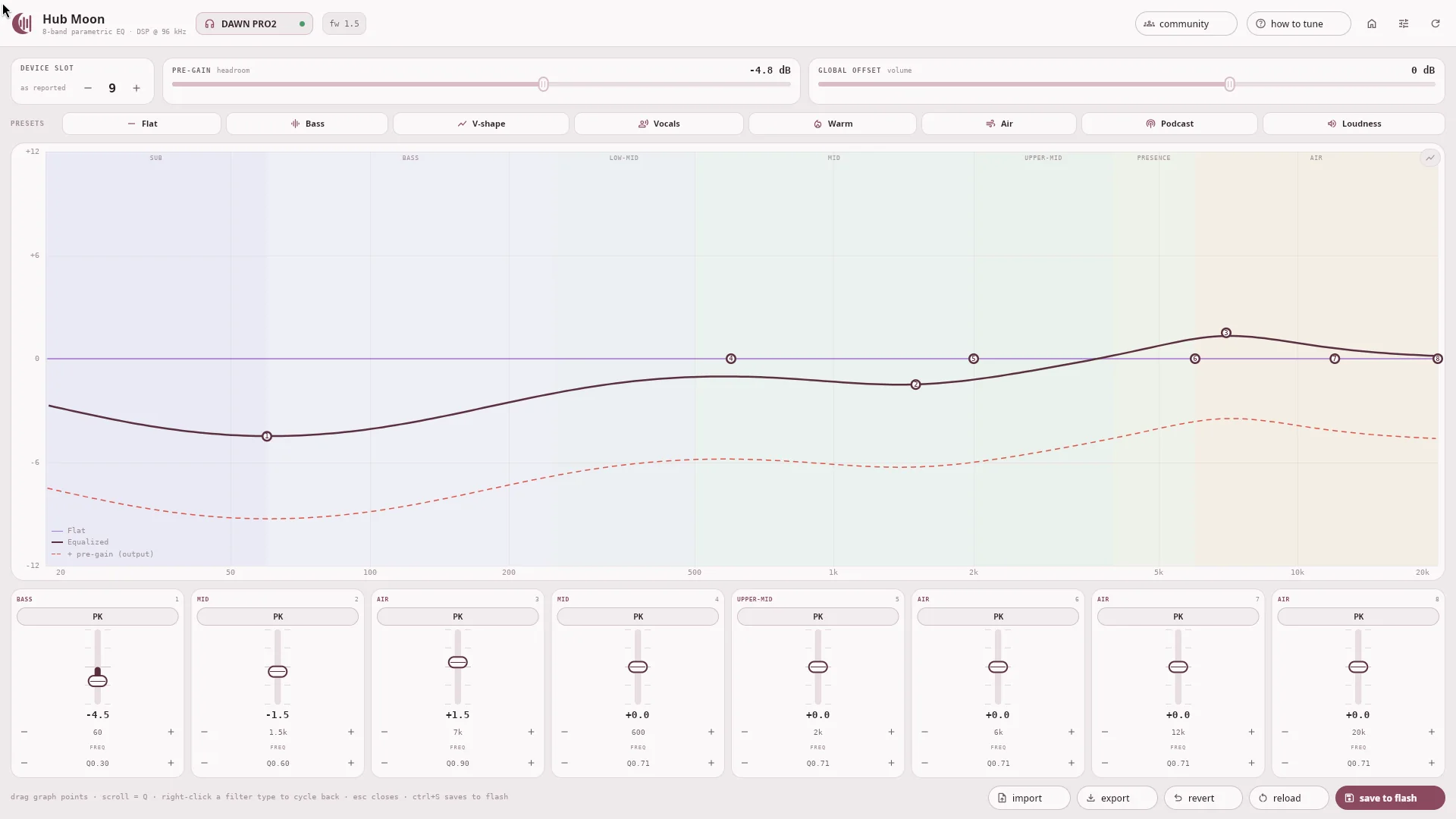
When it does not work
Permissions, nine times out of ten — §03. Otherwise something else already holds the handle: only one process can usefully hold the hidraw at a time, so close the app before writing from a shell.
dlopen(): error loading libfuse.so.2Your distribution ships FUSE 3 only. Install the compatibility package
(fuse2 on Arch, libfuse2 on Debian/Ubuntu), or extract and run
it directly: ./HubMoon-…AppImage --appimage-extract then
./squashfs-root/AppRun.
The prebuilt bundles are glibc. Install from source with
pipx, as above.
hidapi will not buildIt needs the system library and headers. Arch: hidapi;
Debian/Ubuntu: libhidapi-hidraw0 libhidapi-dev; Fedora:
hidapi-devel; openSUSE: libhidapi-hidraw0.
The app opens on a demo curve when no DAC is found — that is by design, so the
interface can be looked at without hardware. Plug the DAC in and press the device chip
in the header, or ctrl+R, to re-scan.
On a DAWN PRO2 the equaliser is toggled on the device: press both volume buttons. Writes only affect the sound in custom-EQ mode.
Install zenity — the file chooser is the desktop's own, and there
is no fallback dialog. The CLI's --export-json and
--import-json need nothing extra.
Removing it
sudo pacman -Rns hub-moonsudo apt remove hub-moonsudo dnf remove hub-moon · sudo zypper remove hub-moonnix profile remove hub-moon, or drop the module importpipx uninstall hub-moonsudo rm /etc/udev/rules.d/70-moondrop.rules — packages remove their own~/.config/hub-moon/ and ~/.cache/hub_moon/. Neither holds device state — your DAC keeps its EQ in its own flash